As you may have noticed, I've added slightly different ad units to my website, specifically the English section. They're from the so-called HilltopAds advertising network. They look something like this:
The thing is, I'm trying to monetize the remaining 1/3 of my audience, which speaks English.
For the past two months, I've been doing what every webmaster should be able to do: observing and analyzing. That's exactly what I did with this ad network. To figure out whether it's worth it, it went something like this ...
About banners and their integration
Installing banners is just as straightforward as with YAN. Just copy the highlighted code block and paste it into your site where you want. Although I was a bit disingenuous when I compared the ease of inserting HilltopAds code to YAN.
The idea is that you simply paste the code at the end of the document and that's it, and it will automatically appear where and when it's needed. So, you'll have to do a little editing to get it where you want it:
Having learned from experience, I didn't develop a complex system for controlling what, where, and what ads are inserted on my site. I simply hardcoded everything into the basic templates. Simply to avoid wasting time on work that might not be worth it.
Moreover, they work rather poorly. For example, if I click on an article title, it's counted as a click on the ad, and a new tab opens. But the banner ad only appears halfway through the page—that's odd and certainly unacceptable.
Types of banners in HilltopAds
The HilltopAds advertising network offers the following ad zones:
Popunder - a type of ad that appears in a new tab or window. For me, this is the most basic form of advertising. Many articles claim that the advantage of these ads is that the user won't even know which website is causing the ad to appear, but yeah, right.
Banners - are generally offered in two versions: for mobile and desktop devices. But the difference between them isn't that great.
In-Page Notifications - these are regular notifications, but not browser-based ones, which require user permission. Like mine, they appear in the top right corner. Basically, they're just snippets of code called by JavaScript.
Video Banner (bottom) - an ad block that always appears in the bottom right corner.
Embedded ad in video
I've tried everything, except for the In-Page Ads, which I couldn't try because I don't have a video :(
Ad Statistics
Now, let's talk about how much I was able to "earn" using this ad network. For clarity, I'll compare the results of HilltopAds ad units with the Yandex Advertising Network. The input data is almost the same as in the article about YAN (views, clicks, earnings). Now, let's continue.
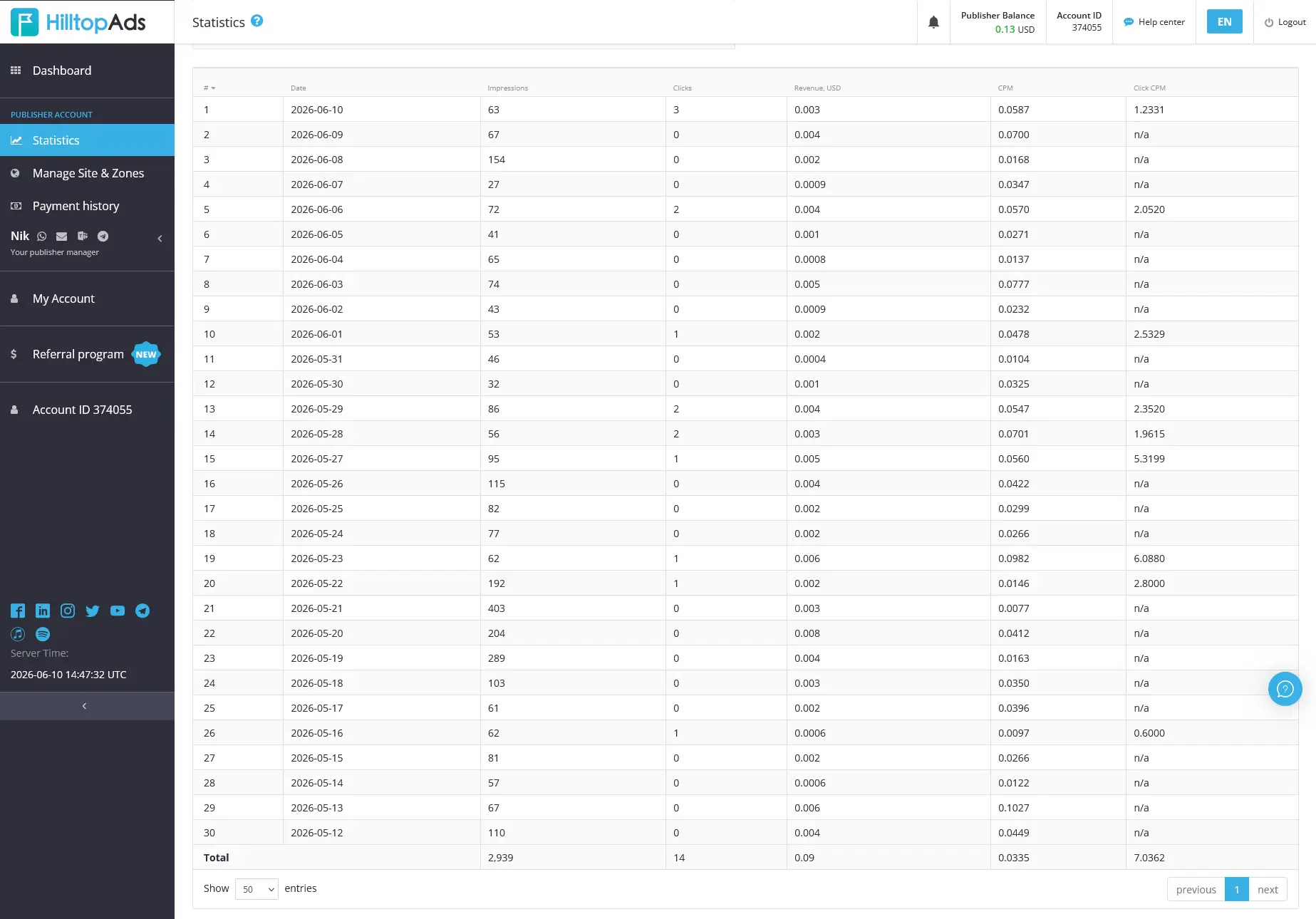
Below, I'll show the statistics from HilltopAds for 30 days. In total, over 30 days, there were 3,000 impressions, 15 clicks, and $0.10 in earnings:
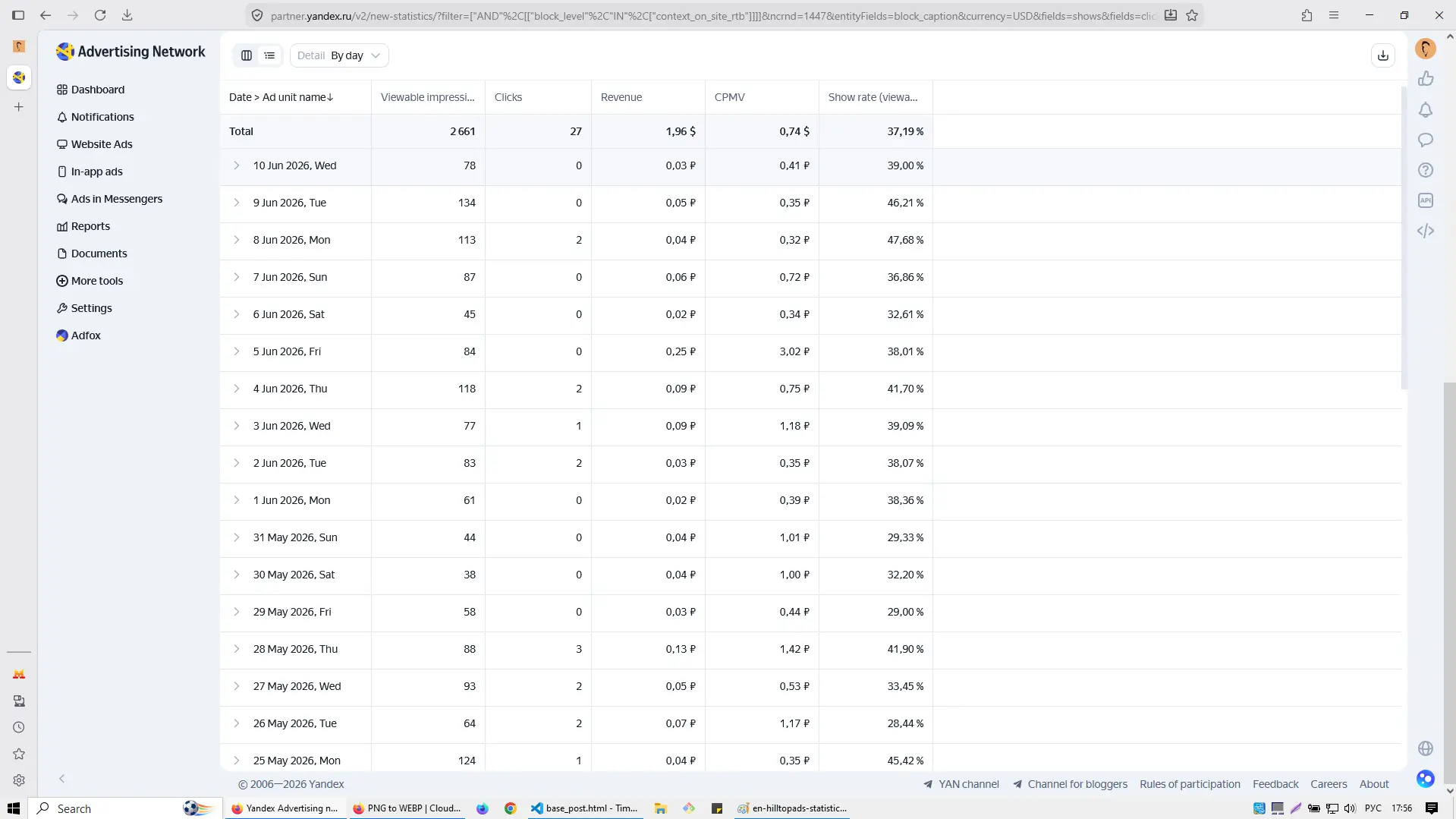
Meanwhile, YAN, with 2,600 impressions and 27 clicks, was able to bring me $2. As you can see, it's like night and day.
This is despite the fact that I don't use the more aggressive forms of advertising that Yandex offers.
Conclusion
To say I'm disappointed is an understatement. HilltopAds can hardly be considered a replacement for YAN in the English segment. The CPM is too low, even for my site. I personally can't recommend this network to small sites and blogs like mine.
I'll soon be removing this network from my site and trying another alternative. And if you have a suggestion or network to recommend, I'd be happy to consider it. For now, that's how it is :)
In this article, I will tell and show on the example of my site how you can earn money on file-sharing services. And is it even possible? Let's analyze the …
Here you'll learn how affiliate programs work, how to choose them, where to place them, and how much you can earn using my website as an example. It includes statistics, …
A detailed personal experience report on integrating a small website with Yandex Ads Network (YAN). Includes moderation requirements, best practices for ad placement, and full revenue analysis (October 2025) for …