


Introduction, or why I've implemented ads into the website
And so, the moment has finally arrived when advertising will appear on my website. I'll say right away, I didn't have any particular illusions about this. My website doesn't get visited very often. Later in the article, I will provide specific traffic figures and how these figures translate into advertising revenue.
This article will be about how my first month with advertising on the site went, October 2025. How and with which ad blocks did I start? Why did I decide to write a separate Django application for this? And why Yandex first and not AdSense? Why was my site accepted, and how quickly did it happen? All this and even more will be in this article.
So, why did I decide to add advertising to the site? Shouldn't I focus on affiliate programs or my own sales, for example? Let's just say it's very simple and it's the most direct way to monetize a website. But although it's the simplest, the devil is in the details. And to earn money from it, especially for websites with traffic like mine, you will have to experiment and test a lot.
And one more reason why I'm doing this. I would like to see at least some return from the site and that I'm not just doing this for nothing. Yes, I confess, I would like to earn money. It's great when what you do brings you pleasure, but it's even cooler when it brings you profit)
A Brief Overview of the Yandex Advertising Network
Let's briefly go over the main terms and how this system actually works.
Further on, I will use the abbreviation YAN (Yandex Advertising Network) because it's shorter and cooler)
This advertising network operates throughout the CIS countries and mainly with a Russian-speaking audience. On the one hand, this is a plus. YAN is the absolute leader in this respect in the post-Soviet space, which provides an excellent opportunity for anyone who wants to earn money on their resource. But on the other hand, you won't be able to enter the international market and globalize your resource.

But if, like me, you're just starting out, Yandex Advertising Network (YAN) is the perfect choice for you.
How it and similar networks work
Let's immediately clarify the fact that Yandex Advertising Network (YAN) is only part of a larger system. Specifically, YAN is designed for owners of advertising platforms. They are also called SSP (Supply Side Platform).
YAN supports the following platforms:
- Websites
- Mobile applications
- Telegram channels
- Blogs on VK, Dzen, YouTube, RuTube
The advertising itself comes from partners of Yandex Direct. Where various advertisers create and configure their advertising campaigns, which then participate in the RTB auction, where they compete for the right to show their advertisement on target platforms to a specific user.
It is also important to understand, although for me, as well as for you, as platform owners, this is not very important. Yandex Direct is only one of 10 advertising systems connected to the Yandex RTB auction. Advertising can come from any of these partners. They are also called DSP systems.
I would like to name the complete list of them, but they are not disclosed; it is only known that Yandex Direct is one of them.
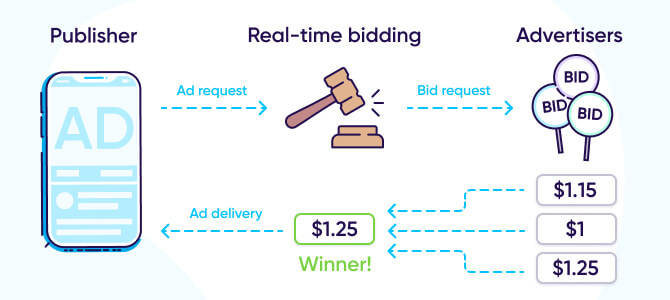
This is a visual representation of how the entire RTB auction system works.
What types of ad units for websites does Yandex offer?
Since I monetize this website, I will only consider ad units for websites. Yandex offers 6 types of ad units, which differ in terms of possible placement locations, the platform on which they can be placed (desktop, mobile devices), and how much space they will occupy. Let's look at each of these ad units.
| Banner | Determined by the website owner. | Crossplatform |
| Fullscreen | By the YAN, but you can determine when and how often to show the ads. | Either Mobile or Desktop |
| At the bottom of the screen, by full width | By the YAN, but you can determine when and how often to show the ads. | Either Mobile or Desktop |
| At the top of the sceen, by full width | By the YAN, but you can determine when and how often to show the ads. | Mobile |
| Feed | Determined by the website owner. | Cross-platform |
| In Images | Below the images, the images are selected using a CSS selector. | Cross-platform |
| Block type | Placement | Platform |
|---|
Let me put here some explanations about the platforms:
- Cross-platform means that you won't have to specify the device type; they will work without additional settings on both devices.
- Either Mobile or Desktop means that you will have to choose between these two and configure them separately.
- Mobile means only for mobile devices.
About moderation and acceptance of new websites
Honestly, I didn't think I would even pass moderation on the first try. Because, you know, you type something like: "Requirements for connecting a website to Yandex Advertising Network" into Google and you get specific numbers for daily traffic, some say 100, some 500, some 1000. And I barely get 50-70 a day <(_ _)>
Don't believe them, but visit the official website with partner requirements. Familiarize yourself with them.
There is a list of prohibited topics that Yandex Advertising Network does not work with. So if your site promotes one of these topics, you can forget about Yandex Advertising Network:
- Content that violates the law, is pornographic or offensive in nature.
- Resources that postulate inequality of people (by gender, race, nationality, etc.).
- Or if you are a crypto enthusiast, or trying to get into casinos, betting, gambling, astrology, magic, esotericism.
So, I was accepted in a day and allowed to work. It was unexpected, but pleasant. But if you couldn't pass moderation, then the possible reasons for rejecting the resource are listed here. Although I hope you won't need this, just like me.
Regarding integrating advertising into a website
Let's move on to how to integrate advertising into a website and how I did it. When you create your first ad unit in Yandex Advertising Network (not only Yandex Advertising Network, but other SSPs also use the same approach), you will be shown the code that you will need to insert into the website for the ads to work.

Typically, this involves a script in the <head> tag, plus the code for the block itself.
I'm getting a little ahead of myself, but simply copying and pasting won't work. And no, everything will work perfectly, but constantly changing the website code, limiting yourself to what you're offered to copy, will be very inconvenient.
As a result, you won't be able to realize the full potential of your website for advertising if you don't dig deeper and try to work with the Yandex Advertising Network API directly through JS. But more on that will be covered in the chapter about the first advertising integration. For now, let's talk about best practices when choosing and placing ads on your website.
Best Practices
These are the recommendations that should be followed and taken into account when choosing the location and type of ad unit. So, here are the key recommendations I was able to find:
- The advertisement should not interfere with the perception of the main content. Advertising should not hinder reading, navigation, or access to the main content that the user came for.
- Clear labeling. All ad units should be clearly labeled as "Advertisement" or "Sponsored Links". I, for example, use a simple container with a corresponding icon.
- No deception, obviously. Do not disguise ads as navigation elements, download buttons, or parts of the content. This violates the rules and annoys users.
- Advertising should not significantly affect loading speed. Make sure that advertising scripts do not slow down the site's loading speed. A slow site worsens SEO and repels visitors.
- It must be responsive to all screens. Make sure that the advertisement is displayed correctly on all devices (desktop, mobile), without blocking the screen.
- Don't overload with too many ads. The recommended figure is somewhere around 30% of all content on the page.
- Only relevant advertising. Use advertising networks that show ads that match the theme of your site and the interests of your audience.
Best Locations for Ad Blocks
An ad placement can be considered the best based on many criteria and metrics, so we can only highlight the most familiar ones:
- Visibility of ad blocks. That is, whether every visitor saw the displayed advertisement.
- Its cost CPMV (Cost Per Mile Viewed). That is, the cost of showing an advertisement to 1000 visitors, provided that the advertisement was seen.
- Effective cost per impression eCPM (effective Cost Per Mile)
- CTR (Click Through Rate)
- Fill rate (Ad block fill rate)
These are just a few; there are more. But let's continue. Now, knowing the main metrics by which one can judge the effectiveness of certain blocks, let's list the possible locations for placing ad blocks. They can be divided into 4 large groups:
1. Above the fold – those blocks that are immediately visible when visiting the page.

On the main page, immediately after the title.
2. In the content – those blocks that are placed within the articles themselves or, for example, on pages with infinite scrolling.

Between the blocks of articles in the pagination:
3. Sticky (or permanently present) - those blocks that are always visible.

Sticky block on the left

Sticky block on the bottom for mobile devices
4. Post-action blocks – these are blocks that appear only after certain actions on the site. These actions may include the completion of the parser's work, or moving to the next article at the end of the current one, or filling out a specific form.

This is the result of an image parsing tool from another website.
Well, it's not rocket science. Just take and place the most profitable ad blocks in the most prominent places, while following all the recommendations, and you'll be happy.
But, as always, it's not that simple. Nobody can say for sure and with 100% guarantee: this ad block, put it here and you will have such and such income.
You will have to constantly sit and test various formats, blocks and placement locations, as well as ensure that the rules of the Yandex Advertising Network itself are not violated. See what brings income and what doesn't. This is a long and continuous process, which is why I decided to write a separate Django application for this, to simplify all this work and take into account all the nuances of the Yandex Advertising Network block placement rules.
A brief overview of my Django application:
My application, its source code can be found in the corresponding repository on GitHub. Or you can download the ready-made package from PyPI. Like this:
The essence of this application is that you, as the website owner, mark the places where you would like to see advertisements. After that, you create the corresponding blocks, configure them and assign them the appropriate location on the site.
How much can you earn from a website like mine?
So, perhaps the most important question in this article is, how much can you earn from a website like mine? Where, compared to other more or less media projects, I'm just a tiny speck. And without any further ado, let's look at the graph for the last 30 days (month):

To avoid making unsubstantiated claims (although you will need an account): https://partner.yandex.ru/v2/new-statistics/?statType=main&reportId=all_context&preset=30days&dimensionFields=date%7Cday&dimensionFields=geo%7Ccountry¤cy=USD&entityFields=domain&entityFields=page_id&entityFields=page_caption&fields=partner_wo_nds&filter=%5B%22AND%22%2C%5B%5B%22page_level%22%2C%22IN%22%2C%5B%22context_on_site_campaign%22%5D%5D%5D%5D
As you can see, all of my monetized traffic comes from Russia. Ads simply aren't shown to anyone else.
Now let's look at the ad display statistics by ad unit:

To avoid making unsubstantiated claims (although you will need an account) : https://partner.yandex.ru/v2/new-statistics/?statType=main&reportId=context_rtb_detailed_report&preset=30days¤cy=USD&entityFields=complex_block_id&entityFields=block_caption&fields=partner_wo_nds&fields=hits&fields=hits_render&fields=shows&fields=cpmv_partner_wo_nds&fields=fillrate&fields=visibility&fields=clicks&filter=%5B%22AND%22%2C%5B%5B%22block_level%22%2C%22IN%22%2C%5B%22context_on_site_rtb%22%5D%5D%5D%5D&dimensionFields=date%7Cday&sort=-partner_wo_nds
I use many different ad blocks in various locations. Let me briefly describe each of the blocks presented:
- The "В постах внизу" block, type Feed. Located at the very bottom after the main content.
- The "В статьях ATF" block, type Banner. Located at the very top, below the title and preview.
- The "В постах липкий" block, type Banner. Always visible when scrolling, to the left of the content in a fixed block. And it's only for the desktop version of browsers.
- The "In-Image" block, type InImage. Located below the images.
- The "В инструментах до" block, type Banner. It is immediately visible when the page loads, only on tool pages.
- The "FloorAd" block, type FloorAd. I only use it for mobile devices, located at the bottom of the screen.
- The "На домашней ATF" block, type Banner. Located on the homepage, at the very top.
- The "В инструментах после" block, type Banner. It is only visible after target actions, for example, parsing images from the site.
- The "В страницах пагинации" block, type Banner. These blocks are natively placed between article and tool cards.
- The "На страницах пагинации" block, type Banner. This is a block at the very top.
- The "На домашней BTF" block, type Banner. A block located in the middle of the homepage.
These are the blocks my website uses. And each has some features that I would like to describe in more detail, after first showing a table comparing the blocks on the site, of course.
| В постах внизу (Feed) | 0,76 $ | 4 331 | 238 | 3,20 $ | 7 |
| В статьях ATF (Banner) | 0,33 $ | 1 470 | 420 | 0,77 $ | 4 |
| В постах липкий (Banner) | 0,32 $ | 1 330 | 810 | 0,39 $ | 1 |
| In-Image (InImage) | 0,28 $ | 2 743 | 713 | 0,39 $ | 2 |
| В инструментах до (Banner) | 0,19 $ | 750 | 336 | 0,57 $ | 4 |
| FloorAd (FloorAd) | 0,13 $ | 663 | 368 | 0,35 $ | 1 |
| На домашней ATF (Banner) | 0,06 $ | 669 | 187 | 0,33 $ | 1 |
| В инструментах после (Banner) | 0,06 $ | 213 | 91 | 0,61 $ | 0 |
| В страницах пагинации (Banner) | 0,03 $ | 152 | 48 | 0,60 $ | 0 |
| На страницах пагинации (Banner) | 0,01 $ | 118 | 33 | 0,32 $ | 0 |
| На домашней BTF (Banner) | 0,00 $ | 164 | 26 | 0,19 $ | 0 |
| Total | 2.16 $ | 12 608 | 3 273 | 0,66 $ | 20 |
| Block's name | Reward | Requests | Visible impressions | CPMV | Clicks |
|---|
What stands out here? Personally, I noticed a certain pattern in the cost per thousand viewable impressions (CPMV). Look, I'll try to explain my point: those ad blocks that confirm a target action or conversion are valued more.
Let me give an example. In fact, my resource is an informational blog, and its main task is to provide content that is engaging and that users want to read to the end. And the "В постах внизу" block is located exactly where the user will end up after completely reading the article. And for the same reason, the "В инструментах после" and "В страницах пагинации" blocks also have a high CPMV.
The "В статьях ATF" and "В инструментах до" blocks are immediately visible and do not confirm a conversion, but they have the most clicks, which is why the cost per thousand viewable impressions is higher.
The First Integration, or Why It's Always Worth Looking into the Matter in More Detail Before Drawing Conclusions
I confess, my first integration wasn't perfect; it brought me about 0 or 1 cent a day. Not much, I know, but basically deserved, because I simply placed Banner-type blocks in "typical places" on the site. I didn't bother with the types of blocks or types of advertising (media, text, video), I just put them in and forgot about it.
I didn't have high hopes, because I had been told many times (and I can read, too) that to earn money from advertising, you need hundreds of thousands of visits per month, let alone my 2,000. I just wanted to finish quickly, see for myself that people were right, and write a corresponding article.
But something made me dig deeper and figure things out. That something was my YandexAdManager application. I needed to add support for all types of blocks and test them accordingly. And the only way I knew to test such applications was my website. I did it, tested it, and was blown away!
It turns out that everything is far from simple. Yandex Advertising Network algorithms, conversions, contextual conversion confirmations, CPMV. All of this affects the cost of impressions on your site and, as a result, your income. I improved my blocks, added other types, and the income went up.
After optimization and the results for the month
After optimizing, improving existing and adding new advertising blocks to the website (since October 6, 2025), revenue increased. Currently, it averages 10 cents per day.

To avoid making unsubstantiated claims (although you will need an account), block's statistics from 06.10 to 26.10: https://partner.yandex.ru/v2/new-statistics/?statType=main&reportId=all_context&dimensionFields=date%7Cmonth¤cy=USD&entityFields=domain&entityFields=page_id&entityFields=page_caption&entityFields=block_type&fields=partner_wo_nds&filter=%5B%22AND%22%2C%5B%5B%22page_level%22%2C%22IN%22%2C%5B%22context_on_site_campaign%22%5D%5D%5D%5D&period%5BstartDate%5D=1759698000000&period%5BendDate%5D=1761512399999
What's funny is that, theoretically, the bounce rate should have increased, but it's actually decreasing :)

Just so you understand, this is my monthly traffic. Again, I'll say it's not much, but I have room to grow and things to optimize.

Website traffic over the past 30 days.
Conclusions or what's next
So, I have 2500 sessions per month, which brings me an income of $0.1 per day or $3 per month. But let's take into account the fact that I haven't yet implemented all the possibilities:
- For example, I want to add a banner before each H2 heading.
- I also thought about adding full-screen advertising when clicking on links within the site at the end of the article (Next article, Previous article and Similar articles).
- Moreover, a third of my audience (English-speaking) doesn't see any ads at all. And this traffic is from the USA, which means the payouts will be higher, about 5 times more.
I think that by integrating all the necessary blocks into the site and monetizing the English-speaking audience, I will be able to achieve an average income of $0.3 per day. Generous, of course, but let's assume that. This means that I will have $8 - $10 per month. Well, at least something. This will be enough to pay for the domain and hosting.
And all I have to do is continue developing this site, little by little, until I achieve a steady income and profit from it. Well, that's all for now, comment, like and share the article on social networks and messengers, bye.


